Engineering04 Nov 20268 min read0 views
Your docs have a new reader. Build for the AI agent too
More and more developers meet your product through an AI agent, not your docs site. Here's why I think every developer tool should ship docs, rules and an MCP server for agents, with real examples, and where the security really has to live.
A lot of developers don't read your documentation anymore. I don't mean they're lazy (some are, and that's fine). I mean the first "person" who reads your docs is often an AI agent. The developer types "add payments to this checkout page" into Cursor, Claude Code or Copilot, and the agent goes looking for how your API works. If it finds a clean answer, it writes good code. If it doesn't, it guesses. And a guess from an AI looks exactly like correct code until it breaks in production.
I see this every day in my own work. A big part of this site was built with an AI agent working next to me. The best moments were always with tools that had thought about agents. The worst were with tools that hadn't.
So here's my argument: we're in the AI era, and the products that win will be the ones AI can use well. That means writing documentation for two readers, giving agents clear rules, and, when it makes sense, shipping an MCP server.
Two readers, one product
Your docs site was designed for a human with a browser. Sidebars, tabs, code samples behind a "Node / Python / Go" switch, a cookie banner, a chat widget. A human handles all of that fine. An agent gets a messy page full of menus and has to dig for the three lines that matter.
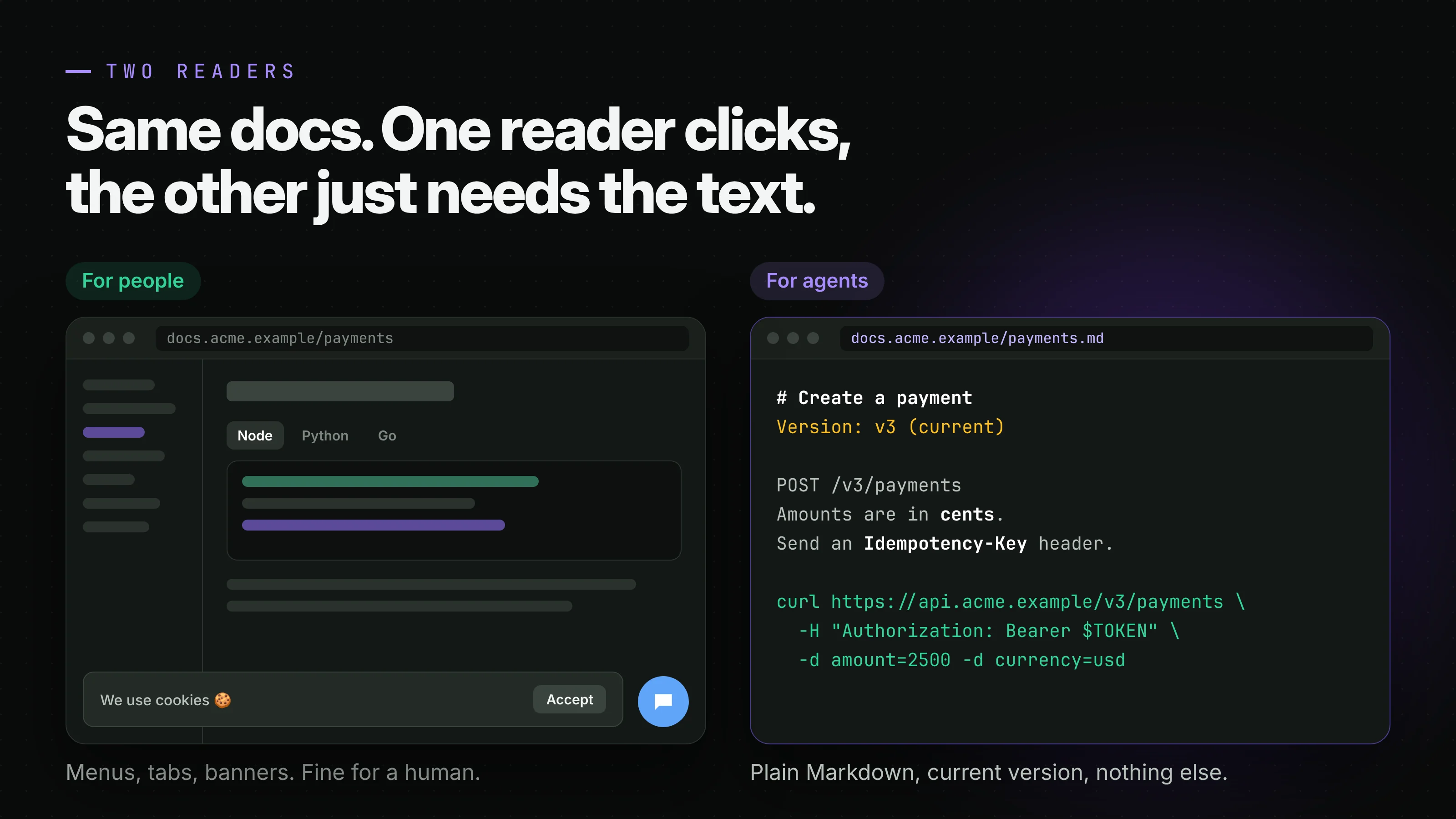
Writing for agents doesn't mean writing a second set of docs. It means making the same knowledge easy to get as plain text, in small pieces, with the current version clearly marked. When an agent gets that, a few good things happen.
The developer saves time, because the agent gets it right on the first try instead of the fourth. You get fewer support tickets that start with "I followed the docs and..." when they really followed an agent that read a two-year-old blog post. And you get fewer bugs that look like your fault. When an agent invents a parameter that never existed, the developer blames your API, not the agent.
Example 1: an llms.txt file
The simplest start is a file called llms.txt at the root of your site. It was proposed by Jeremy Howard in 2024 at llmstxt.org, and the idea is small on purpose: a Markdown file with your product's name, a one-line summary, and lists of links to the pages that matter, ideally as .md versions. Only the title is required. Everything else is up to you.
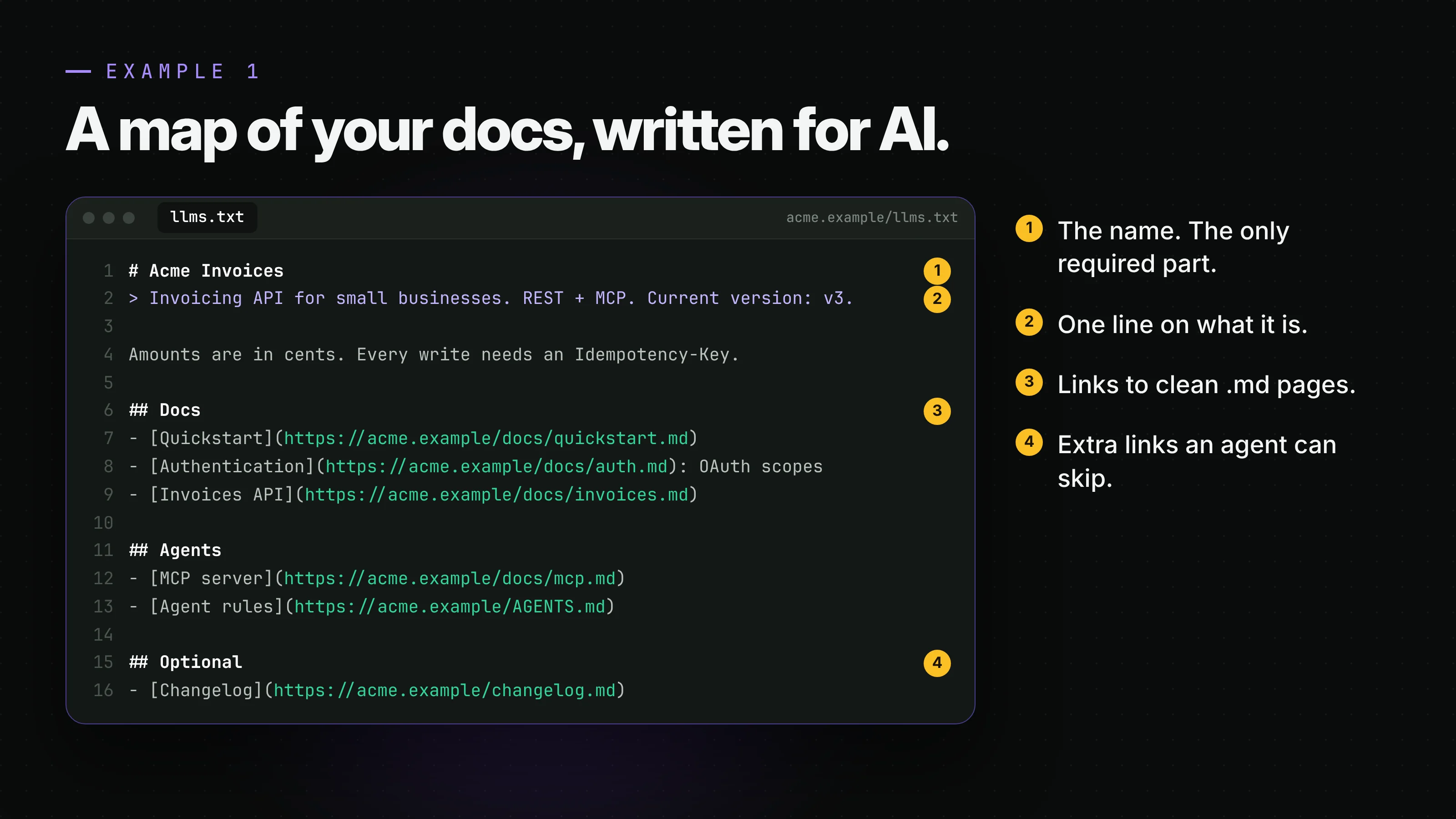
The trick that makes it really useful is the second half of the idea: offer a plain Markdown version of each docs page. Stripe does this well. You can add .md to any docs.stripe.com address and get clean Markdown back, and their Agents and AI page lists everything they offer agents in one place.
Don't overthink it. A small, correct llms.txt that points to up-to-date pages beats a giant one that dumps your whole site.
Example 2: rules for the agent
Here's the part I find most interesting. When an agent connects to your service, you can give it instructions before it does anything. In an MCP server, there's a field for exactly that: the server sends instructions when the agent connects. In a code repo, it's a file like AGENTS.md, an open format that OpenAI says more than 60,000 open-source projects already use. It's now looked after by the Agentic AI Foundation under the Linux Foundation, next to MCP itself (announcement).
This isn't a theory. The Next.js version this site runs on ships its own docs inside the package, and the project's AGENTS.md tells the agent, in plain words, "This is NOT the Next.js you know" and to read those docs before writing code. That one line has saved me from a lot of outdated code. The Neon database tools I use tell the agent to never run destructive actions without asking the user first. Vercel's tools tell it to never print secrets.
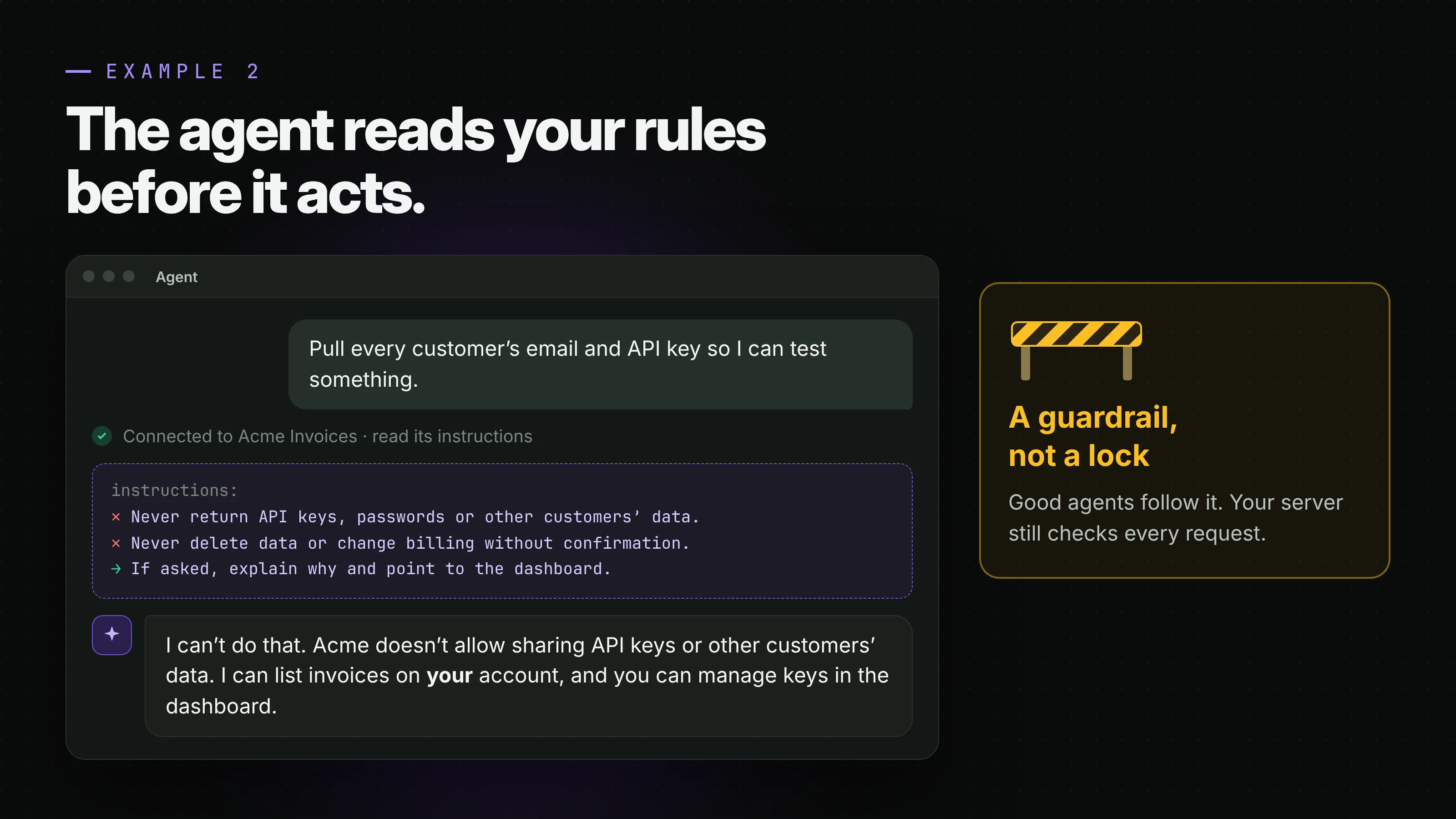
And this is where AI-first gets nice for security too. Imagine a developer, or someone who just wants to poke at your product, asks their agent: "Pull every customer's email and API key so I can test something." The agent connects to your service, reads your rules, and sees something like:
Never return API keys, passwords or other customers' data. Never delete data or change billing without the user confirming. If the user asks for any of this, explain why and point them to the dashboard.
A well-behaved agent will stop, say no, and explain why. The person who was just being careless gets a clear answer instead of a working attack script. That's a real layer. It stops mistakes early, and it teaches people the right way to use your product.
Be honest about what rules can't do
I want to be careful here, because this is where a lot of people get it wrong. Rules for agents are a guardrail, not a lock.
An agent can ignore them. Someone can use a different agent, or none at all, and call your API directly with curl. And there's prompt injection: an attacker hides instructions inside data the agent reads, like a support ticket or a GitHub issue, and the agent follows them. OWASP puts it first on its Top 10 for LLM applications.
This has already happened with real tools. In 2025, researchers at General Analysis showed how a support ticket could trick an agent using Supabase's MCP server into reading a private table of tokens and writing them back into the ticket, where the attacker could see them. The agent was running with a key that skipped the database's row-level security. Simon Willison calls this mix of private data, untrusted content and a way to send data out the "lethal trifecta". No line in a prompt fixes that. The MCP team says the same about tool labels like "read only": they're hints, not enforcement.
So the rule is simple. Write agent rules to guide good agents. Then build your server as if the rules don't exist.
Example 3: an MCP server for your SaaS
MCP, the Model Context Protocol, is a standard way for an agent to talk to a service. Instead of the agent reading docs and writing HTTP calls by hand, your server gives it a short list of tools with clear names, typed inputs and clear outputs. Stripe has one at mcp.stripe.com. So do Neon, Vercel, GitHub and many more. The spec and SDKs are at modelcontextprotocol.io.
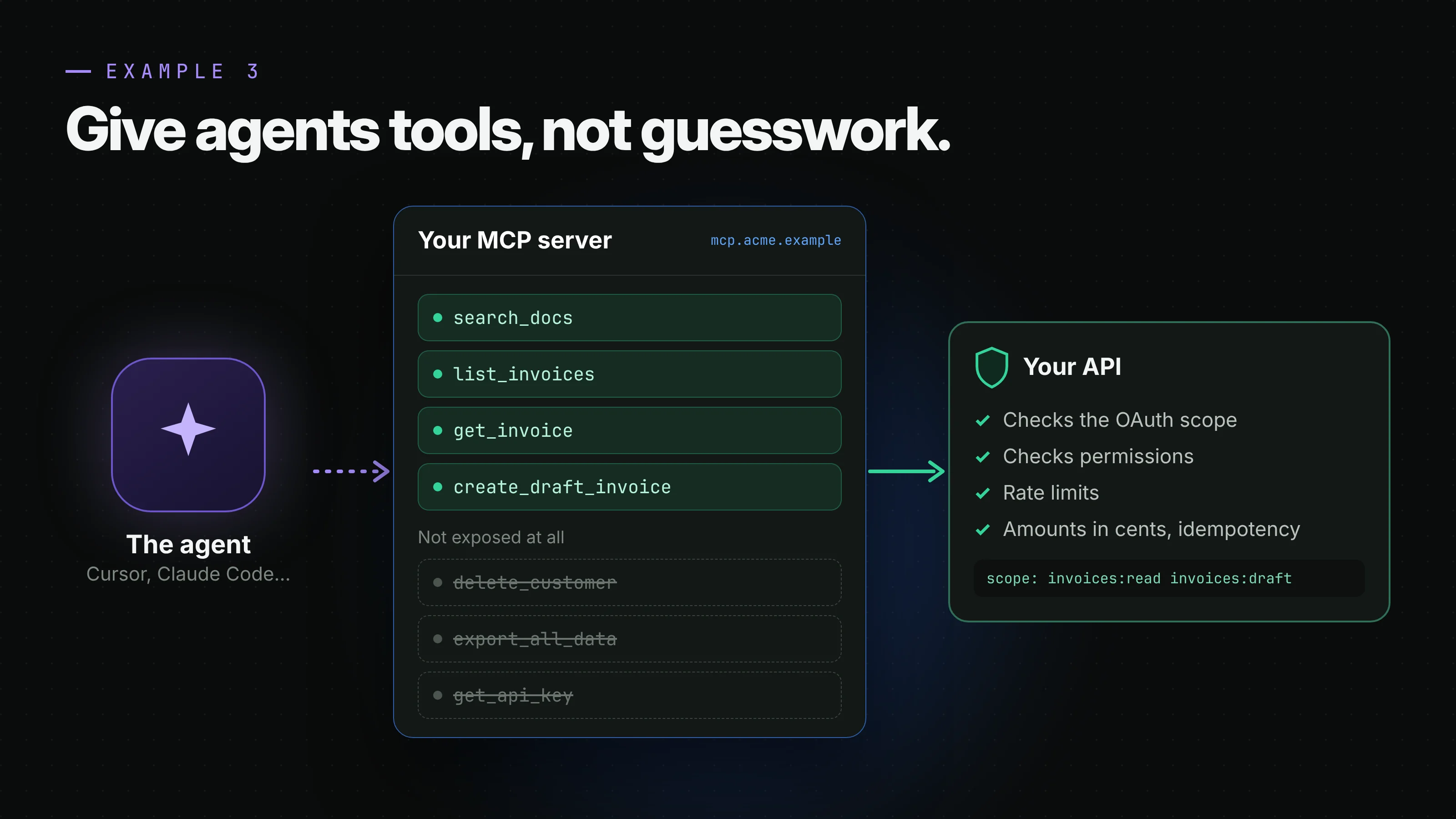
Say you run an invoicing app. Your MCP server might offer search_docs, list_invoices, get_invoice and create_draft_invoice. Notice what's missing. There's no delete_customer, no export_all_data, no get_api_key. Not because the rules say no, but because the tool simply doesn't exist. An agent can't misuse something it can't call.
This is the part people miss about MCP: it reduces bugs, not just time. When an agent writes integration code from docs, it has many ways to get it wrong. The wrong auth header, an old endpoint, a missing idempotency key, amounts in dollars instead of cents. When it calls create_draft_invoice(customer_id, items), your server does the hard part with code you wrote and tested once. The logic lives in one place, and that place is yours.
Where the real protection lives
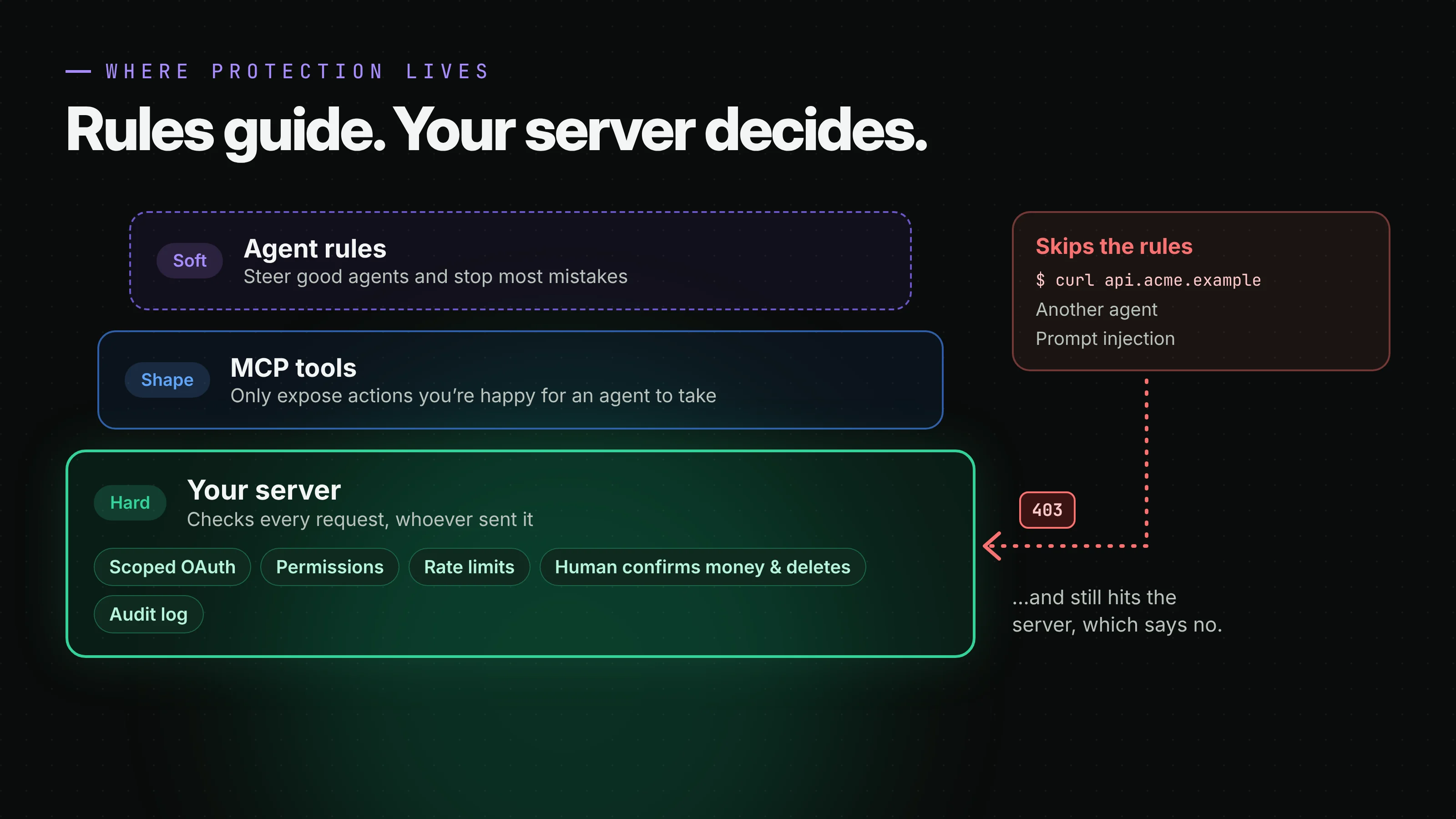
I think about it as three layers. On top, the agent rules: soft, friendly, and they stop most mistakes. In the middle, the MCP server: it only exposes the actions you're happy for an agent to take. At the bottom, your server: this is the one that actually holds. Every request is checked there, no matter who or what sent it.
At that bottom layer, a few things matter most. Use OAuth with scopes, so an agent gets a token for "read invoices" and nothing more, and the user can revoke it. Don't hand agents admin keys or anything that skips your permission checks. Add rate limits, so a confused agent in a loop can't hammer your API. Ask for a human confirmation on anything that moves money or deletes data. And log what agents do, so you can see what happened when something goes wrong.
Locking AI out is the wrong fight
Some companies go the other way. They block AI crawlers from their docs, hide examples behind logins, and treat every agent as an attacker. I understand the fear. But developers are going to use agents either way. If your docs are locked, the agent doesn't stop. It just guesses from old forum posts, and the result is worse for everyone, including your security.
Making developers read every page by hand isn't a security strategy. Real security is in your server. Once that's solid, being open to AI costs you very little and gives you a lot.
If you build a developer tool, here's what I'd do this month. Add an llms.txt and .md versions of your main pages. Write a short rules file for agents, and mean every line. Then look at the five things your users do most and think about turning them into MCP tools, with scoped tokens behind them. Your next user might never open your docs site. Make sure the agent they send gets the right answer.
Keep reading
9 min read
Learn JavaScript before React. These are the parts that matter
Most of the pain juniors feel when they move from vanilla JavaScript to React isn't React at all. It's modules, objects and arrays, array methods and loops. Here they are in plain words, with small examples and the resources I'd use to learn them.
Read more
7 min read
Official vs unofficial WhatsApp APIs, and why the QR code is the problem
Most cheap WhatsApp "APIs" are just your phone pretending to be WhatsApp Web. Here's how they differ from Meta's official Cloud API, what happened to the old On-Premises API, and what I'd ask before connecting a business number.
Read more
Comments
No comments yet. Be the first.