Engineering04 Nov 20269 min read0 views
Learn JavaScript before React. These are the parts that matter
Most of the pain juniors feel when they move from vanilla JavaScript to React isn't React at all. It's modules, objects and arrays, array methods and loops. Here they are in plain words, with small examples and the resources I'd use to learn them.

When I moved from plain JavaScript to React, I thought React was the hard part. It wasn't. Every time I got stuck, the problem was a piece of JavaScript I had skipped. An import I didn't understand. A .map() I copied without knowing what it returned. State that "didn't update" because I changed an array in place.
I see the same thing with almost every junior developer I help. So this post is the guide I wish I had back then. It's short on purpose. Read it, try the examples in your browser console, and React will feel a lot friendlier.
React is mostly JavaScript
Look at this small component. It's the kind of thing you'll write in your first week of React.
import { useState } from "react";
import Card from "./Card.jsx";

export default function TodoList({ items }) {
  const [filter, setFilter] = useState("all");

  const visible = items.filter((item) =>
    filter === "done" ? item.done : true
  );

  return (
    <ul>
      {visible.map((item) => (
        <Card key={item.id} {...item} />
      ))}
    </ul>
  );
}
Only two things here are React: useState and the HTML-looking JSX. Everything else is plain JavaScript: import and export, destructuring ({ items } and [filter, setFilter]), an arrow function, a ternary (? :), .filter(), .map() and the spread ...item.
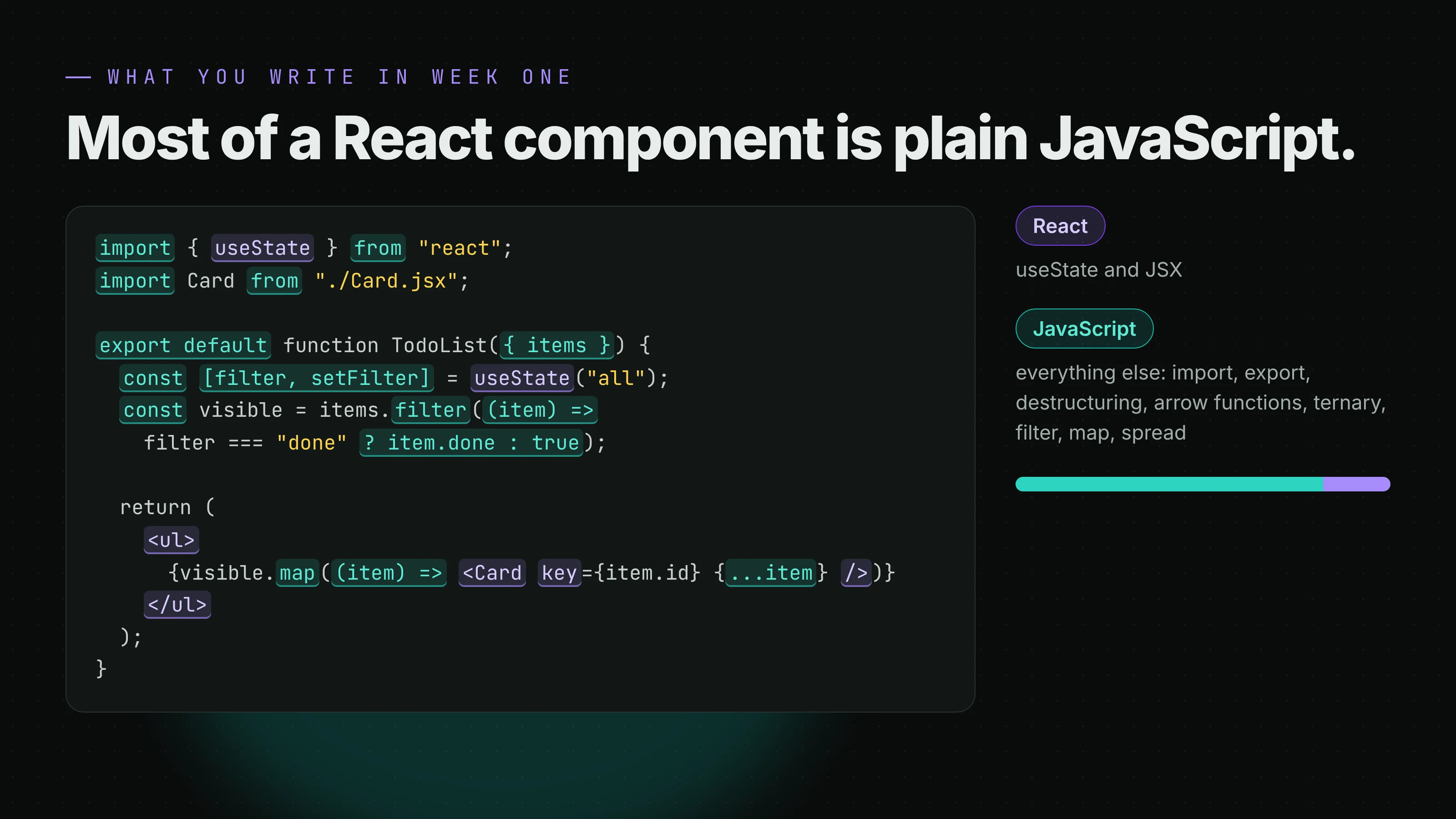
If any of those look strange, that's what to learn first. Let's go through them one by one.
ES6 and modules: what's the difference?
This confuses a lot of people, so let's clear it up.
ES6 (also called ES2015) is a version of JavaScript. It was a big update in 2015 that added a lot of the things you see in modern code: let and const, arrow functions, template strings, destructuring, spread, classes, promises, and modules.
Modules are one feature that came with ES6. A module is just a file that can share things with other files using export, and use things from other files using import.
So it's not "ES6 or modules". Modules are part of ES6.
Before modules
Before modules, every file shared one big global space. You loaded scripts in the right order and hoped no two files used the same variable name.
<script src="utils.js"></script>
<script src="app.js"></script>
<!-- app.js can only use utils.js because it was loaded first -->
With modules, each file keeps its variables to itself. It only shares what it exports.
How import and export work
There are two kinds of export: named and default.
// math.js
export const add = (a, b) => a + b;      // named export
export const PI = 3.14;                  // named export
export default function multiply(a, b) { // default export (only one per file)
  return a * b;
}
// app.js
import multiply, { add, PI } from "./math.js";

add(2, 3);       // 5
multiply(2, 3);  // 6
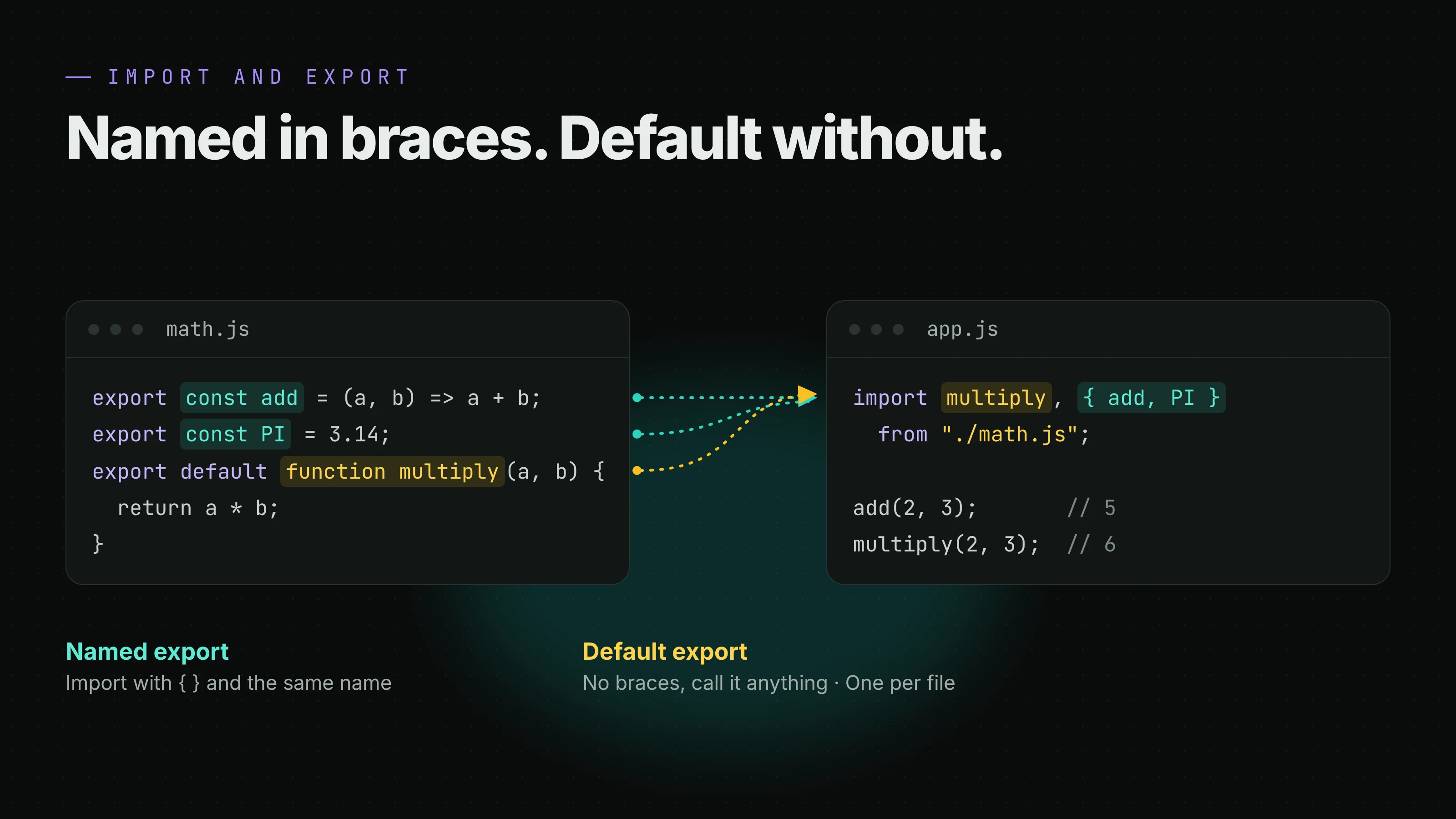
The simple rule:
- Named exports are imported with curly braces, and the name must match:
import { add } from "./math.js". - A default export is imported without braces, and you can call it anything:
import times from "./math.js"works too.
That's why in React you write import { useState } from "react" (named) but import Card from "./Card.jsx" (default). If you ever see X is not exported or undefined is not a function, check the braces first. It's the most common mistake I see.
What about require() and module.exports?
That's CommonJS, the older module system Node.js used before ES modules existed. You'll still see it in older tutorials and some config files.
// CommonJS (older Node.js)
const express = require("express");
module.exports = { add };

// ES modules (what React projects use)
import express from "express";
export { add };
They do the same job with different words. In a React project (Vite, Next.js), use import and export.
Why does my import work in React but not in a plain HTML file?
In a React project, a tool like Vite or Next.js (called a bundler) reads all your imports and joins your files together for the browser.
In a plain HTML page there's no bundler, so you have to tell the browser the file is a module, and use the full file name:
<script type="module" src="app.js"></script>
import { add } from "./math.js"; // the ".js" is required here
The ES6 features you'll see on every React page
You don't need all of ES6. These five show up everywhere.
let and const. Use const by default, and let only when you need to reassign. Forget var.
Arrow functions. A shorter way to write a function. When there are no curly braces, the value is returned for you.
const double = (n) => n * 2;          // returns n * 2
const greet = (name) => {
  return `Hi ${name}`;                 // with braces, you write return
};
Template strings. Backticks let you put values inside a string: `Hello ${name}`.
Destructuring. Pull values out of an object or array into variables. React uses this for props and for useState.
const user = { name: "Sara", age: 24 };
const { name, age } = user;           // name = "Sara", age = 24

const [first, second] = ["a", "b"];   // first = "a", second = "b"
Spread (...). Copy the contents of an array or object into a new one.
const a = [1, 2];
const b = [...a, 3];                  // [1, 2, 3]

const user2 = { ...user, age: 25 };   // a copy with a new age
Two newer helpers worth knowing: ?. and ??
These came after ES6, but you'll see them a lot.
user.address?.city   // undefined instead of an error if address is missing
count ?? 0           // use 0 only if count is null or undefined
Data: values, objects and arrays
This is the part that causes most "my React state doesn't update" bugs.
JavaScript has simple values (primitives) like numbers, strings and booleans. When you copy one, you get a real copy.
let a = 5;
let b = a;
b = 10;
console.log(a); // 5, a didn't change
Objects and arrays are different. A variable doesn't hold the array itself. It holds a reference to it, like an address. Copy the variable, and you copy the address, not the array.
const list = [1, 2];
const sameList = list;
sameList.push(3);
console.log(list); // [1, 2, 3], the "original" changed too
Why this matters in React: React decides whether to re-render by checking if you gave it a new array or object. If you change the old one in place, it's still the same address, so React thinks nothing happened.
// Wrong: same array, React may not re-render
todos.push(newTodo);
setTodos(todos);

// Right: a new array with the old items plus the new one
setTodos([...todos, newTodo]);
So, in React, treat arrays and objects in state as read-only. Make a new one instead of changing the old one.
What are Map and Set?
Two more ES6 data structures. You won't need them often in React, but it's good to know they exist.
- Set is a list with no duplicates:
new Set([1, 1, 2])holds1and2. Handy for removing duplicates:[...new Set(tags)]. - Map is like an object, but keys can be anything (even objects), and it keeps the order you added things.
For most React state, plain arrays and objects are the better choice.
Array methods: which one do I use?
Array methods are the heart of React code. The trick is to know what each one gives back. Here's the same list with each method:
const products = [
  { name: "Pen", price: 2, inStock: true },
  { name: "Book", price: 12, inStock: false },
  { name: "Bag", price: 30, inStock: true },
];
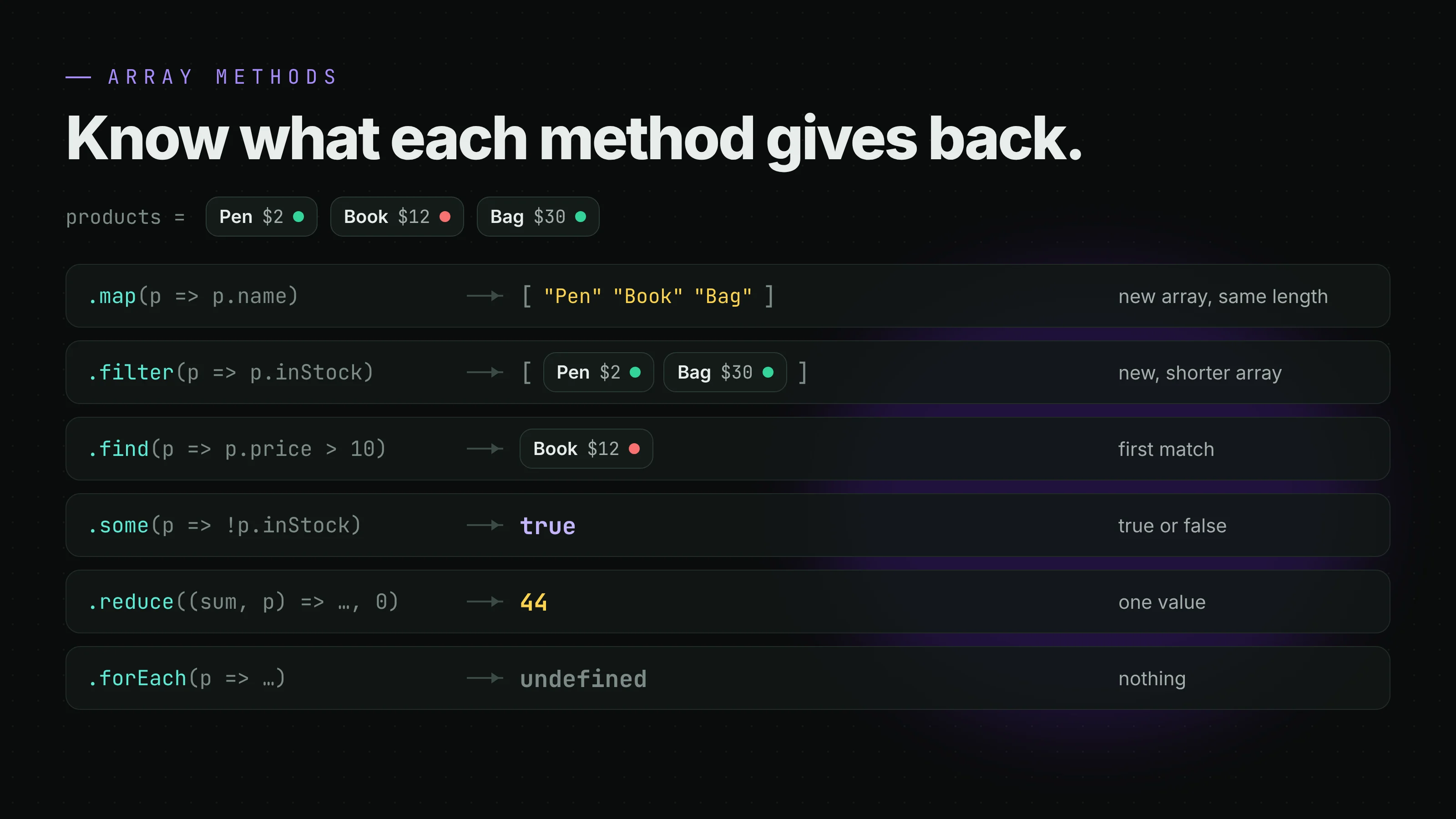
- map turns every item into something else, and gives you a new array of the same length.
products.map((p) => p.name)gives["Pen", "Book", "Bag"]. - filter keeps only the items that pass a test, and gives you a new, shorter array.
products.filter((p) => p.inStock)gives the Pen and the Bag. - find gives you the first item that passes, or
undefined.products.find((p) => p.price > 10)gives the Book. - some and every give you true or false. Does any item pass? Do all of them?
products.some((p) => !p.inStock)givestrue. - includes checks if a simple value is in the array:
["a", "b"].includes("a")givestrue. - reduce squeezes the whole array into one value, like a total.
products.reduce((sum, p) => sum + p.price, 0)gives44. - forEach runs a function for each item and gives back nothing (
undefined).
reduce, step by step
reduce scares a lot of people, so here's what happens inside it:
products.reduce((sum, p) => sum + p.price, 0);
// start: sum = 0
// Pen:   sum = 0 + 2   = 2
// Book:  sum = 2 + 12  = 14
// Bag:   sum = 14 + 30 = 44
// result: 44
The 0 at the end is the starting value. Always give one.
Careful: some methods change the original array
These methods change the array you call them on: push, pop, shift, unshift, splice, sort and reverse. In React state, that's the bug we talked about above.
map, filter, slice, concat and spread don't change the original. They give you a new array, which is exactly what React wants.
// sort changes the original. Copy first:
const cheapFirst = [...products].sort((a, b) => a.price - b.price);

// or use the newer non-changing version:
const cheapFirst2 = products.toSorted((a, b) => a.price - b.price);
Loops, and why React code uses map instead of forEach
JavaScript has several ways to loop:
for (let i = 0; i < items.length; i++) { }   // classic for loop
for (const item of items) { }                // for...of: each value of an array
for (const key in user) { }                  // for...in: each key of an object
while (condition) { }                        // while: until the condition is false
items.forEach((item) => { });                // forEach: a method, returns nothing
All of them are fine in plain JavaScript. A simple rule: use for...of for arrays, for...in (or Object.keys) for objects, and a classic for when you need the index or want to break early.
In React, though, you'll almost always see map. Here's why.
Inside JSX's curly braces { }, you can only put an expression, something that gives back a value. React then shows that value on the screen.
mapgives back a new array of elements. React can show an array.forEachgives backundefined. React shows nothing.- A
forloop isn't an expression at all, so you can't even put it inside{ }.
// Shows nothing: forEach returns undefined
<ul>{items.forEach((item) => <li>{item}</li>)}</ul>

// Works: map returns an array of <li> elements
<ul>{items.map((item) => <li key={item}>{item}</li>)}</ul>
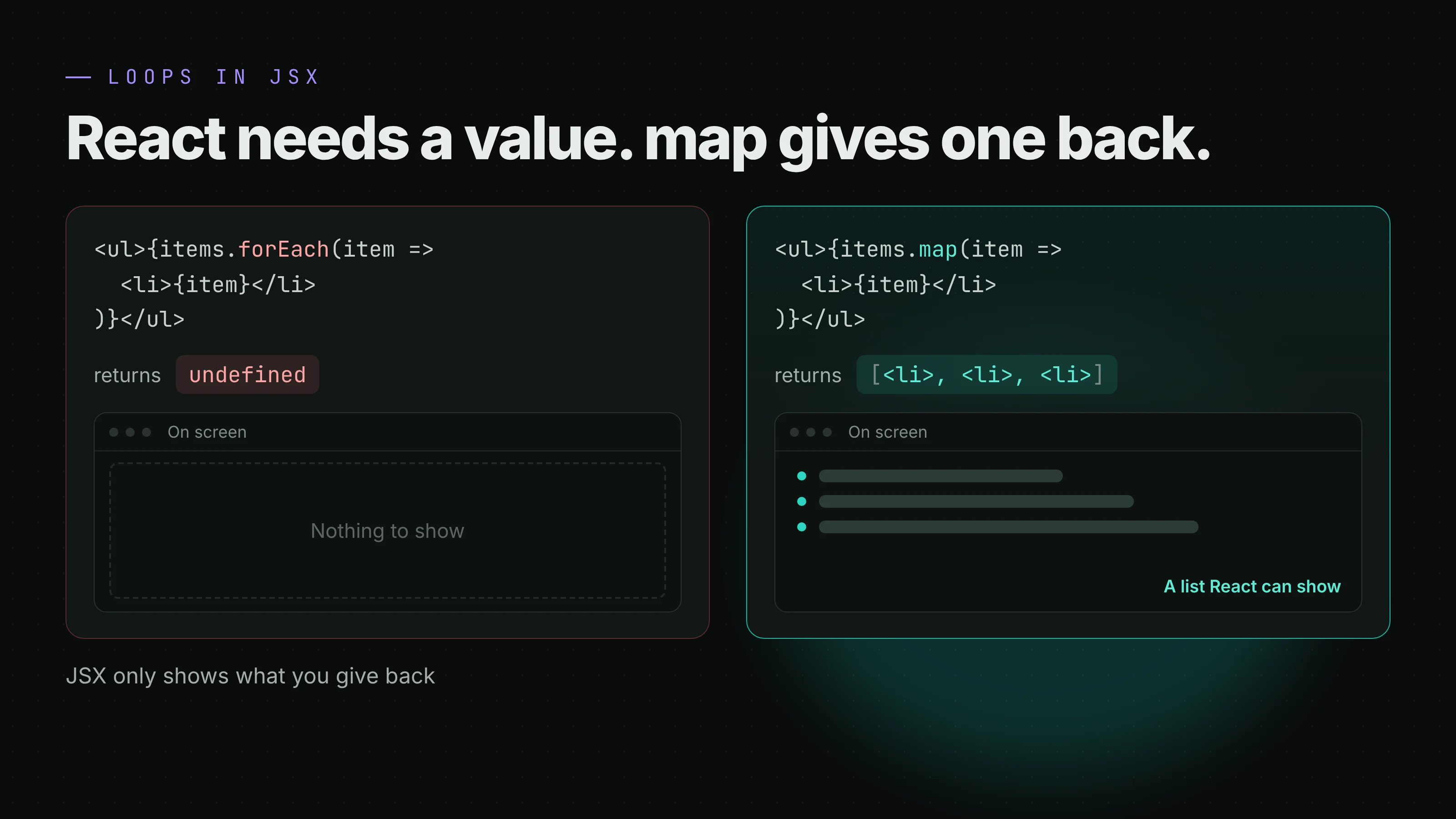
That's the whole secret. map isn't "better" than forEach. It just gives back a value, and React needs a value. Use forEach when you only want to do something (like log or send each item), and map when you want to turn a list into a new list, like a list of elements.
What is the key prop?
When you render a list, React asks for a key on each item so it can tell the items apart when the list changes. Use something unique and stable, like an id from your data:
{users.map((user) => <li key={user.id}>{user.name}</li>)}
Avoid using the index (key={i}) when items can be added, removed or reordered.
One more trap: && with numbers
A common way to show something only sometimes is condition && <Element />. It works with true and false, but not with 0:
{count && <p>{count} new messages</p>}      // shows "0" when count is 0
{count > 0 && <p>{count} new messages</p>}  // shows nothing when count is 0
Make the left side a real true or false, and you're safe.
Resources I recommend
You don't need ten courses. Pick one or two and practice every day.
- MDN JavaScript Guide: the reference I still use every week. Free, and always up to date. If you only bookmark one page, make it the Array page.
- javascript.info: The Modern JavaScript Tutorial. Clear chapters with small tasks at the end of each one. Free.
- Eloquent JavaScript by Marijn Haverbeke: a full book you can read for free online. Great for understanding why things work, not just how.
- You Don't Know JS Yet by Kyle Simpson: free on GitHub. Read it after the basics, when you want to understand scope, closures and
thisproperly. - Meta Front-End Developer Professional Certificate on Coursera: this is the one I'd pick if you want a full path with structure. It's made by Meta (the company behind React), it's for beginners, and it goes in the right order: HTML and CSS, then a whole course on JavaScript, then React Basics and Advanced React, and a final project. You can audit the courses for free, and Coursera offers financial aid if you want the certificate.
And one exercise that teaches more than any course: build a small to-do app in plain JavaScript first. Add, delete, mark as done, filter. Then build the same app again in React. You'll see exactly what React does for you, and you'll never forget it.
Before you start React
If you can say "yes" to these, you're ready:
- I know the difference between a named and a default import.
- I can use destructuring and spread without looking them up.
- I know that arrays and objects are copied by reference.
- I know what
map,filter,findandreducegive back. - I know why
mapworks inside JSX andforEachdoesn't.
None of this is hard. It just needs a bit of time before React, instead of a lot of confusion during it.
Keep reading

8 min read
Your docs have a new reader. Build for the AI agent too
More and more developers meet your product through an AI agent, not your docs site. Here's why I think every developer tool should ship docs, rules and an MCP server for agents, with real examples, and where the security really has to live.
Read more
7 min read
Official vs unofficial WhatsApp APIs, and why the QR code is the problem
Most cheap WhatsApp "APIs" are just your phone pretending to be WhatsApp Web. Here's how they differ from Meta's official Cloud API, what happened to the old On-Premises API, and what I'd ask before connecting a business number.
Read more
Comments
No comments yet. Be the first.