Security04 Nov 20268 min read
Your SaaS should offer OAuth, not just API keys
Google and GitHub let other apps "Connect" instead of asking users to copy a key. Your product can do the same. Here's why it's worth being an OAuth provider, from someone who has built on both kinds of product.
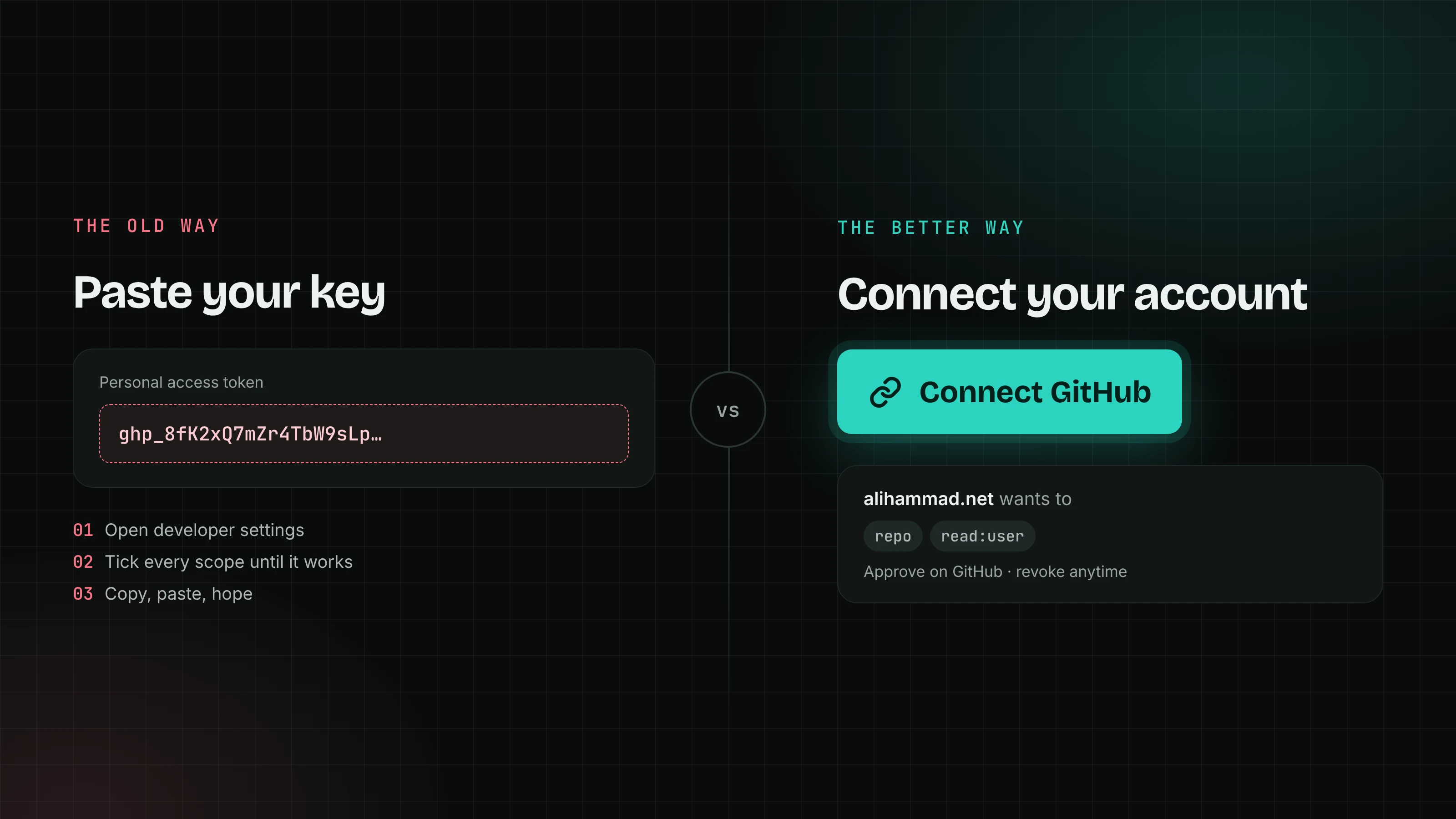
You have seen this screen. "Open our dashboard, go to Settings, then API keys. Create a new key, copy it, and paste it into the other tool." Your users see it every time they want to plug your product into something else, and the only thing in between is an empty text field.
Now think about how the same thing works with Google or GitHub. Another app shows a "Connect GitHub" button, GitHub asks you what to allow, and you're done. Nobody copies anything. That isn't magic only big companies get. It's because GitHub is an OAuth provider: it lets other apps ask for access to a user's account through a standard flow, instead of handing out keys.
Your SaaS can be one too. I've been on the receiving end of both kinds of product. My job application dashboard reads my GitHub and LinkedIn every Monday, so I've built against a provider that does OAuth well and one that half does it. The difference is big, and most of it lands on the people who use your product.
What a pasted key really is
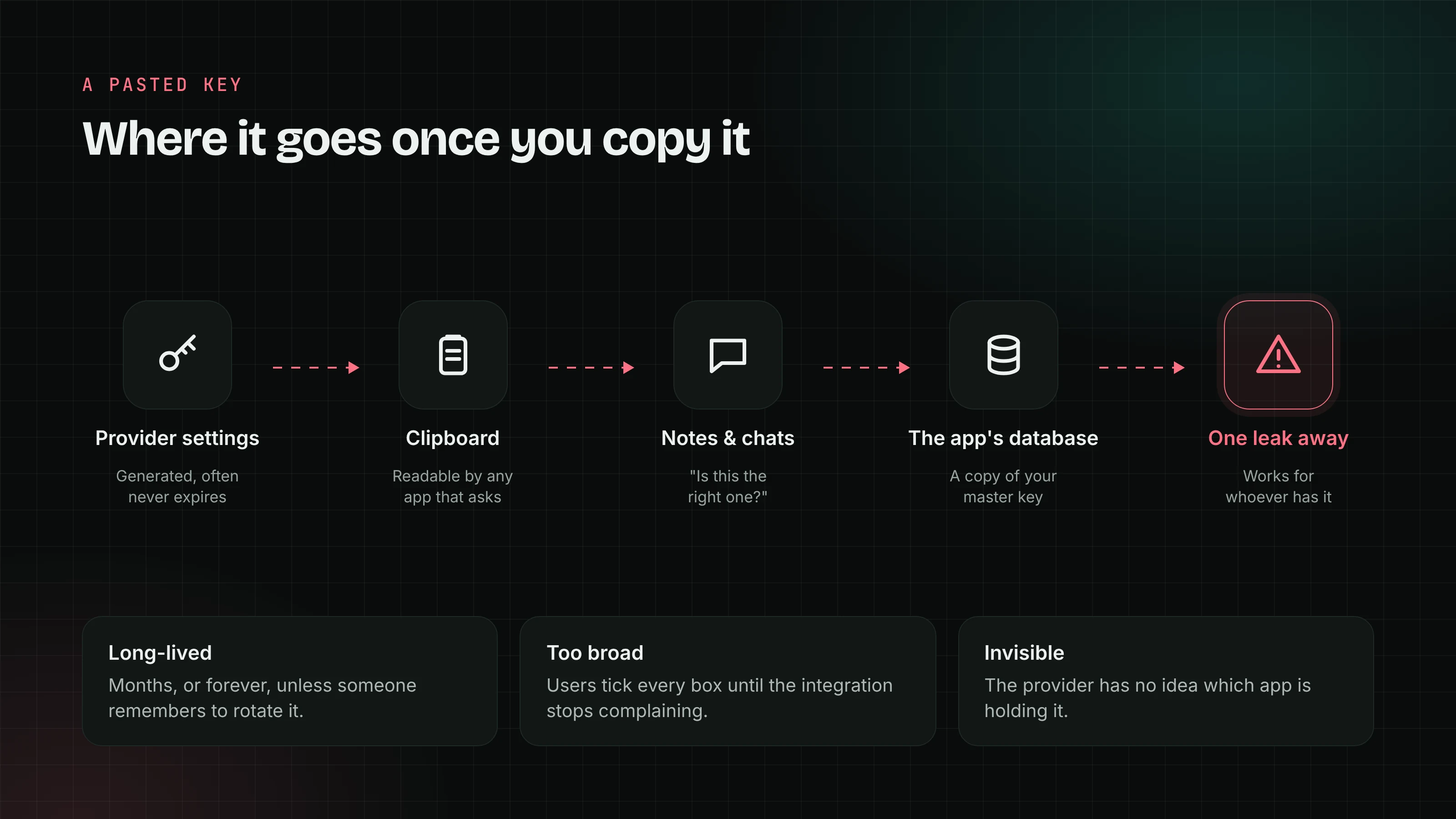
An API key your product issues is a password with no login page in front of it. It usually lives for months or never expires. It's often broader than it needs to be, because the user can't tell which permissions the other tool needs, so they pick "full access" until it stops complaining. And on its way out of your product it passes through the clipboard, maybe a notes file, maybe a Slack message asking "is this the right one?".
Once it's pasted, a third party holds a copy of that key, and you have no idea it happened. You can't tell which app is using it, you can't show the user who has access, and if that third party's database leaks, every key in it works against your API for whoever has it. From your side, it all looks like the user.
What being an OAuth provider changes
Your users never touch the secret. The other app sends the browser to your consent page, the user signs in and approves there, and you hand back a one-time code. The app swaps that code for a token on its server. Nothing goes through the clipboard.
You decide what the permissions mean, and you explain them. You define the scopes, like projects:read or invoices:write, and your consent screen says in plain words what each one allows. The user approves exactly what the app asked for, instead of guessing which boxes to tick on a key.
Every integration has a name. Each app registers with you and gets its own client id. You know which app made each request, you can rate limit it on its own, and if one goes bad you can switch it off for everyone without breaking anyone else.
Revoking is one click, in your product. A "Connected apps" page lists every app the user has approved, with a Remove button next to each. That's what GitHub's Settings, Applications page does for me. The user never has to find a key, remember where they pasted it, or rotate it and break three other tools.
Tokens can expire. You can issue short-lived access tokens with refresh tokens behind them. A leaked token that dies in an hour is a much smaller problem than a key that lives forever.
Other developers want to build on you. "Add a Connect button" is a much easier pitch to an integration partner than "write a guide telling users where to find their key". And AI agents are now joining in: MCP, the protocol AI tools use to connect to other services, uses OAuth for its authorization. If you only offer keys, your users end up pasting them into chatbots.
What it looks like in my app
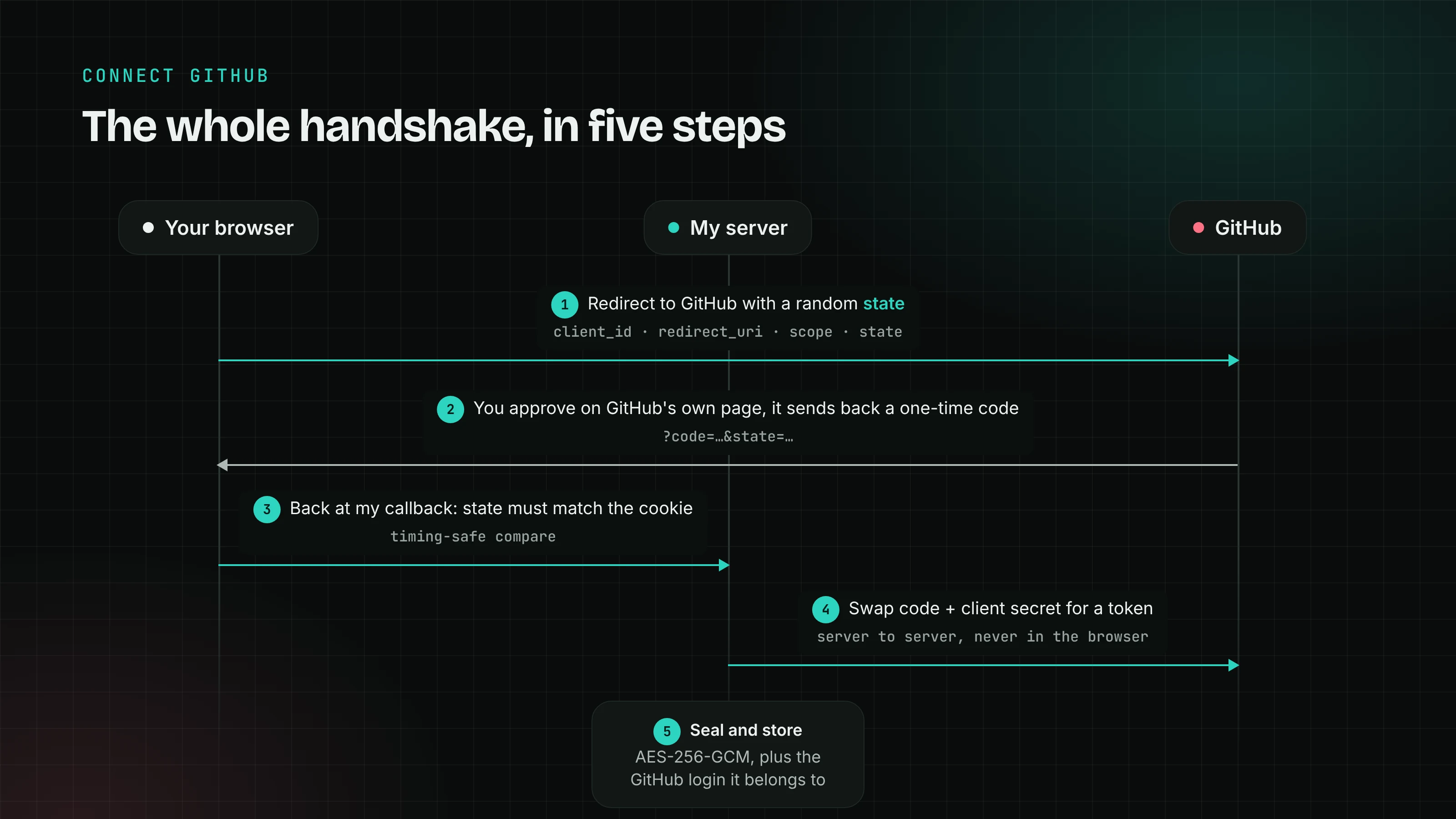
This is the other side of the flow, and it shows how little work a good provider leaves for the people building on it.
My GitHub connection is two small routes. The first one creates a random state value, keeps it in a short-lived, http-only cookie, and redirects to GitHub with my client id, the callback address, the scopes and that state. The second one is where GitHub sends the user back. It checks that the returned state matches the cookie, exchanges the code for a token on my server, asks GitHub who the token belongs to, and stores the token encrypted. It's around a hundred lines, error handling included.
That's short because GitHub did the hard part: the consent screen, the token endpoint, the Applications page, the docs. LinkedIn is the counterexample. The API I need only works for members in the EU, EEA and Switzerland, so my LinkedIn panel still has an "Or paste a token instead" section and a data-export upload. Every bit of that extra UI exists because the provider stopped short.
What it takes to offer it
Being a provider is more work than generating keys, but it's a well-trodden path, and you shouldn't write the protocol yourself.
- App registration. A page where developers create an app and get a client id, a client secret and their allowed callback URLs.
- An authorize endpoint and a consent screen. The user signs in, sees the app's name and the scopes in plain words, and approves or declines.
- A token endpoint. It swaps codes for access tokens and refresh tokens, and checks PKCE so a stolen code is useless on its own.
- Scopes that match how your product is used. Read and write separately, per area of the product. This is the part only you can design.
- A "Connected apps" page and a revocation endpoint. So users and apps can both end access cleanly.
Use a maintained OAuth server library or the OAuth server feature of your auth provider for the protocol, and spend your own time on the scopes and the consent screen.
What OAuth doesn't fix
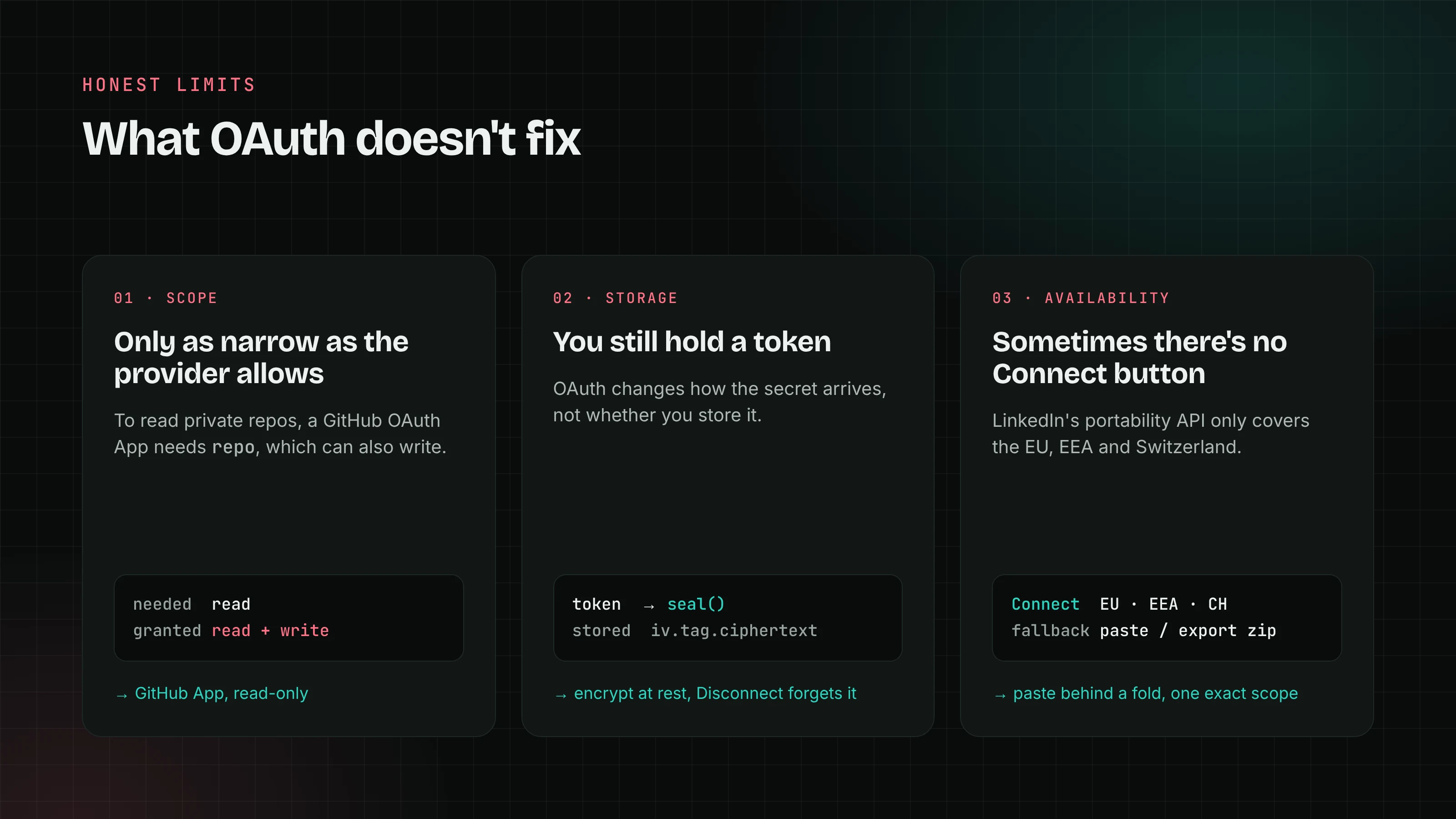
I don't want to oversell this, because my own code shows the limits.
Scopes are only as fine as you make them. For a classic GitHub OAuth App, the only scope that can read private repositories is repo, and it also grants write access. My weekly scan only reads, but the token could do more. That's a provider decision I'm stuck with. If you build an OAuth server, don't repeat it: split read from write from the start.
Someone still stores a token. OAuth doesn't remove the secret from the app that connects to you, it just changes how it got there. Mine is sealed with AES-256-GCM before it's saved, and Disconnect deletes it. As a provider you can't enforce that, but short-lived tokens limit the damage when someone doesn't.
It's more for you to run. Consent screens, token storage, refresh, revocation and docs are all things you now own. For a small product with two integrations, that can feel like a lot. It pays off once other people start building on you.
When keys are fine
API keys aren't evil. They're the right tool between servers you control: your backend talking to a payment provider, a cron job calling an email API, a developer scripting against their own account. I keep my own keys in Vercel's environment settings and nowhere else. Keep offering them for that.
The problem is narrower than "keys are bad". It's making keys the only way in, so that every integration means a user copying a long-lived credential out of your product and pasting it into someone else's.
If you're building a SaaS with an API
- Offer OAuth for anything a third-party app does on a user's behalf, and keep API keys for the user's own scripts and servers.
- Design small scopes, with read and write separate, and describe each one in plain words on the consent screen.
- Require
stateand PKCE, and only redirect to callback URLs the app registered. - Issue short-lived access tokens with refresh tokens.
- Give users a "Connected apps" page that shows each app, what it can do and when it last used access, with a Remove button that works right away.
- Log and rate limit per app, so one bad integration never looks like your user.
It's more work than a "Create key" button. But it moves the riskiest part of every integration out of your users' clipboards and into a flow that was designed for exactly this. Google and GitHub figured that out a long time ago. Your users will notice when you do too.